


If you’re planning to build or upgrade your conference room, congratulations! You’re on the path to creating a workspace that encourages productivity and collaboration.
Today’s modern conference rooms require more than just a table, a few chairs, and a projector. To truly enhance functionality and efficiency, they need to be equipped with the right AV technologies. These technologies not only improve communication but also streamline workflows and create a better experience for everyone involved.
Before we dive into the technical details, let’s walk through the essentials. This article will outline the five must-have AV technologies that every modern conference room should have. We’ll break down each one and explain how it can elevate your conference room setup without overwhelming you with complex jargon. Ready? Let’s get started!
What is a Modern Conference Room?

A modern conference room is more than just a meeting space. It’s a hub where ideas are shared, strategies are developed, and teams collaborate in real time, regardless of their physical location.
With more businesses adopting hybrid work environments, it’s important to ensure that your conference room is flexible and equipped to handle virtual meetings, presentations, and team discussions with ease.
For a conference room to be fully functional in today’s fast-paced work environments, it must be equipped with AV technologies that can support clear communication, high-quality presentations, and seamless connectivity. The right AV setup transforms a room into a dynamic, efficient space where meetings can happen smoothly regardless of their location, i.e. in the office or dialling in remotely.
Let’s discuss the five key AV technologies every modern conference room needs.
1. Crystal-Clear Video Conferencing Systems
With more people valuing flexibility and work-life balance, working from home is here to stay. That’s why a reliable video conferencing system is essential AV technology that keeps meetings running smoothly, no matter where people are working from.
Why You Need It:
- Video conferencing technology allows team members, clients, and partners to communicate clearly, regardless of location.
- High-definition video enhances professionalism, making presentations and meetings more impactful.
- Clear audio ensures that everyone is heard, preventing miscommunication during important discussions.
In a modern conference room, your video conferencing system should integrate seamlessly with platforms like Zoom, Microsoft Teams, or Google Meet. Additionally, having features like screen sharing and chat functionality built into your system ensures smooth collaboration during meetings.
Practical Advice
When selecting a video conferencing system, prioritise user-friendliness. Systems that offer AI-enhanced features – such as auto-framing, which keeps participants centred in the frame, and noise reduction technology – will help minimise distractions and ensure high-quality meetings. Some systems can even adjust video quality in real time based on bandwidth, making them ideal for businesses with remote teams.
At Digicom, we provide customised video conferencing solutions tailored to your specific needs. If you’re looking for simple setups or advanced features like AI-driven enhancements, we’ll help you choose the right system to keep your communication seamless. Learn more about our video conferencing services here and discover how we can enhance your conference room experience.
2. Interactive Whiteboards for Real-Time Collaboration
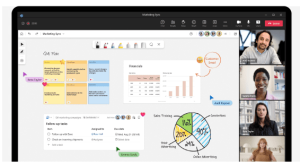
Traditional whiteboards and projectors have evolved into something far more dynamic and should be on your list for top AV tech for conference rooms. Interactive whiteboards now offer teams the ability to collaborate in real time, making meetings and presentations more engaging. With touch-based input, users can easily annotate documents, draw out ideas, and make adjustments seamlessly during brainstorming sessions or presentations.
Why You Need It:
- Interactive whiteboards enhance participation by allowing real-time collaboration, even with remote attendees.
- They enable you to visually map out ideas, enhancing creative sessions and brainstorming meetings.
- Remote team members can actively contribute by interacting with the whiteboard from their own devices, making it perfect for hybrid teams.
Interactive whiteboards can replace traditional projectors, offering a more engaging and flexible presentation tool. They allow users to save their annotations and notes instantly, which can be sent to all participants after the meeting. This ensures that no valuable insights are lost and is an excellent conference room AV solution.
Practical Advice:
When shopping for an interactive whiteboard, opt for one that supports multiple users simultaneously. This allows different team members to contribute without needing to take turns, which keeps meetings efficient. Additionally, make sure it integrates with popular productivity tools like Microsoft Office or Google Workspace for a smoother workflow.
3. Wireless Presentation Systems
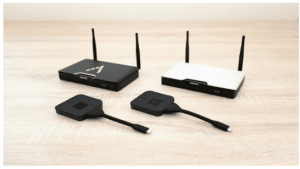
Next up on our list of conference room AV solutions is wireless presentation systems. This makes sharing content during meetings so much easier – instead of searching for the right cable or adapter, users can simply connect their devices directly to the conference room display. Using this AV technology allows everyone to present their content smoothly and without any interruptions.
Why You Need It:
- Wireless presentation systems eliminate the need for physical connections, reducing setup time and improving the flow of meetings.
- They support various devices (laptops, tablets, smartphones), making it easy for multiple people to share their screens.
- The flexibility of wireless systems keeps your conference room clutter-free and organised, creating a more professional atmosphere.
Wireless presentation systems help keep meetings running smoothly, whether it’s a sales pitch, project update, or creative brainstorming session. They allow presenters to switch seamlessly, making collaboration more efficient and flexible.
Practical Advice:
When choosing a wireless presentation system, consider one that supports multiple platforms (Windows, macOS, Android, and iOS) to accommodate all types of devices. Look for systems that offer low latency and high-resolution streaming, so your presentations run smoothly and without delay.
If you’re unsure which system is right for your workspace or need help setting up a streamlined digital environment, Digicom can offer guidance. We can provide practical advice on AV technologies and assist in creating a setup that fits your specific needs. Find out more about optimising your workspace here.
4. High-Quality Audio Systems for Clear Communication
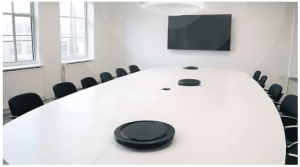
No meeting is productive if participants struggle to hear what’s being said. Clear audio is essential for any modern conference room, and a high-quality audio system ensures that every word is heard clearly, regardless of the size of the room or the number of participants.
Why You Need It:
- Advanced audio systems ensure even sound distribution throughout the room, so everyone can hear the conversation clearly.
- Wireless microphones give flexibility to presenters and participants, while speakers ensure clear sound quality.
- Noise-cancellation and echo-reduction technologies enhance the overall experience, eliminating background noise or disruptions.
Audio quality is especially important for virtual meetings, where poor sound can lead to miscommunication or frustration. With a good audio system, participants can focus on the content of the meeting rather than struggling to hear or be heard.
Practical Advice:
When setting up your audio system, take into consideration the acoustics of your conference room. Larger rooms may require ceiling-mounted microphones and additional speakers to ensure even sound distribution. If your room is smaller, a soundbar with integrated microphones and speakers could be the perfect solution.
At Digicom, we can help you assess your conference room’s acoustics and recommend the right audio solution tailored to your space. Our team will ensure your setup provides clear, consistent sound, no matter the size or layout of your room. Contact us to learn more about how we can assist with your AV needs.
5. Room Control Systems for Effortless Management
Managing the various technologies in your conference room can become complicated without the right controls in place. Room control systems simplify this process by allowing you to manage all your AV equipment from a single interface, which can often be controlled by a smartphone or tablet.
Why You Need It:
- Room control systems make it easy to manage multiple devices (lighting, audio, video, temperature) from one centralised interface.
- These systems allow for pre-set configurations, so you can adjust the room setup depending on the type of meeting or presentation.
- Intuitive control panels make it simple for anyone to operate the room’s technology, even if they aren’t particularly tech-savvy.
By centralising control, you can eliminate unnecessary delays in setting up your meeting space. Whether it’s adjusting the lighting for a presentation or switching from a video call to a slideshow, a room control system ensures that everything runs smoothly.
Practical Advice:
Look for a system that offers smartphone or tablet integration, giving users the ability to adjust settings from anywhere in the room. Also, consider customizable options that let you tailor the control system to your specific conference room needs, so it can grow with your business.
Looking to Improve Your Conference Room?
Creating an efficient and productive meeting space starts with having the right AV technologies in place. If you’re considering an upgrade or planning a new setup, Digicom can help guide you through the process. We offer advice and support to help you choose the best solutions for your needs.
Feel free to reach out for a consultation or to learn more about how we can help optimise your conference room setup. We’re here to assist with whatever stage you’re at.


